Перед выводом
- Вывод — это реальное ончейн-действие
- Средства уходят с баланса Hyperliquid
- Вывести можно только свободный баланс
- Средства, занятые в открытых позициях, вывести нельзя
Вывод средств
Вы можете вывести средства с Hyperliquid в любой момент.
Локапов нет: если средства свободны и не используются в позиции, вы можете отправить их обратно на свой кошелёк.
Что делает этот шаг
Вывод переводит свободные средства с Hyperliquid обратно на внешний кошелёк.
Пока средства находятся на балансе Hyperliquid, они могут использоваться для торговли и обеспечения позиций.
После вывода они больше не участвуют в торговле на Hyperliquid.
Это финальный шаг жизненного цикла: средства возвращаются из торговой системы обратно под ваш прямой контроль.
Шаг 1 — откройте панель вывода
Экран: кнопка Withdraw в интерфейсе
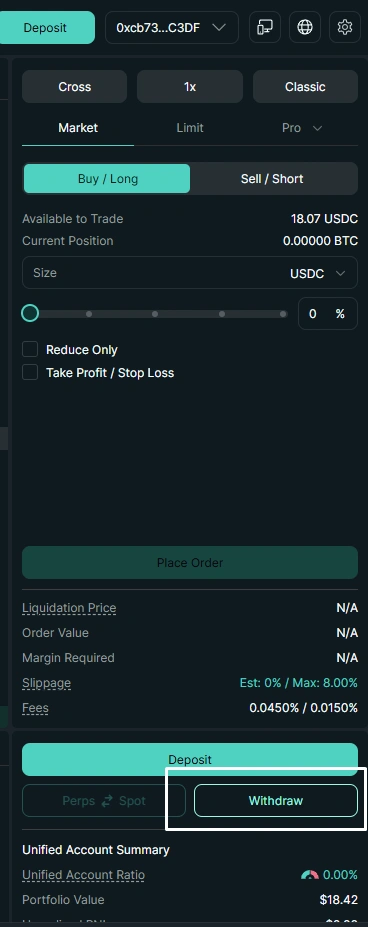
Кнопка Withdraw в торговом интерфейсе.
Начните с основной торговой панели.
Нажмите Withdraw, чтобы открыть панель вывода.
Доступный баланс
Вы можете вывести только средства, которые не используются в открытых позициях.
Перед выводом всего баланса убедитесь, что все позиции закрыты.
Шаг 2 — укажите детали вывода
Экран: форма вывода
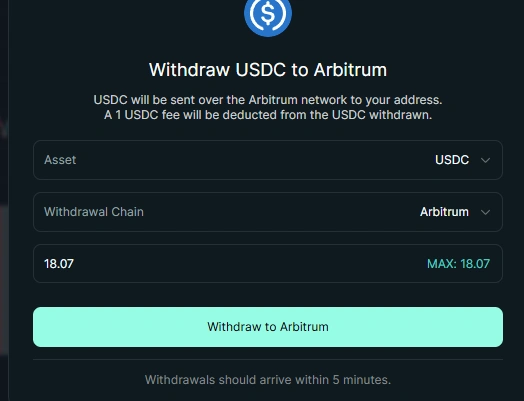
Форма вывода USDC в сеть Arbitrum.
В форме вывода вы выбираете:
- актив, например USDC
- сеть вывода, например Arbitrum
- сумму
Доступная сумма зависит от свободного баланса.
Средства, которые сейчас используются в позиции, недоступны для вывода.
Основы вывода
- вывод обычно обрабатывается быстро
- есть небольшая фиксированная комиссия, обычно около 1 USDC
- средства отправляются обратно на ваш кошелёк
Шаг 3 — подтвердите вывод
Экран: подтверждение в кошельке
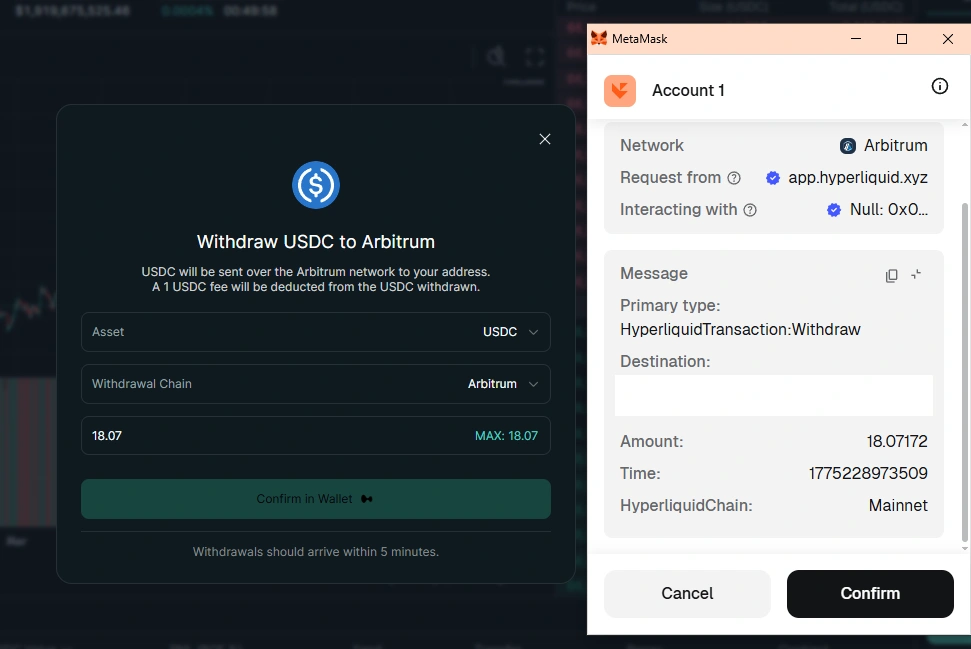
Всплывающее окно подтверждения в кошельке.
Когда вы подтверждаете вывод, кошелёк просит подписать транзакцию.
Что происходит:
- вы подписываете запрос на вывод
- транзакция отправляется в сеть
- после подтверждения средства начинают возвращаться на ваш кошелёк
Это момент, когда ваше намерение становится реальным ончейн-действием.
Шаг 4 — средства уходят с Hyperliquid
Итоговое состояние
После подтверждения:
- средства отправляются на ваш кошелёк
- они уходят с баланса Hyperliquid
- они больше не доступны для открытия или поддержки позиций
Куда попадают средства
После вывода средства возвращаются на ваш кошелёк в сети Arbitrum.
Дальше вы можете хранить их, использовать в другом DeFi-приложении или отправить на биржу.
Проверьте всё перед подтверждением
Всегда проверяйте:
- сумму
- сеть
- адрес кошелька
После подтверждения транзакцию нельзя отменить.
Как думать о выводе
Вывод — это не просто кнопка “забрать деньги”.
Это момент, когда свободные средства перестают быть доступными для торговли на Hyperliquid и возвращаются на ваш кошелёк.
До вывода они могут использоваться как свободный баланс для торговли.
После вывода они снова находятся вне Hyperliquid и больше не влияют на ваши позиции, доступный залог или торговые возможности.
Вывод на Hyperliquid и вывод с обычной биржи
Ключевая идея
Вы можете вывести только свободные средства — то, что сейчас не используется в открытых позициях.
Закрепление
Вывод работает по той же логике, что и остальные действия:
- вы отправляете действие
- система применяет его
- баланс обновляется
После завершения вывода эти средства больше не участвуют в торговле на Hyperliquid.
Частые ошибки
- пытаться вывести средства при открытых позициях
- выбирать неправильную сеть
- не проверять адрес и сумму перед подтверждением
- спешить и подписывать транзакцию без проверки деталей
Контроль остаётся у вас
От депозита до торговли и вывода вы контролируете средства на каждом этапе.
Но контроль означает ответственность: проверяйте сеть, адрес, сумму и свободный баланс перед подтверждением.
Можно переходить дальше, когда
- Вы понимаете, почему вывести можно только свободный баланс
- Вы знаете, что происходит после подтверждения вывода
- Вы понимаете, что выведенные средства больше не участвуют в торговле на Hyperliquid