Before you deposit anything
A deposit is a real action. It moves funds out of your wallet and into the system’s trading context. This step cannot be undone once confirmed. Nothing else happens automatically as a result of making a deposit.
Where your funds live before and after a deposit
Before a deposit, your funds live in your wallet. The wallet is what holds the assets and what authorizes any movement of those assets.
After a deposit, your funds are reflected in an internal trading balance. Trading does not happen directly from the wallet; it happens against this internal balance shown in the interface.
The balance represents system state, not custody. It shows what the system considers available to trade — it is not a new wallet and it does not perform any action by itself.
Configuring a deposit
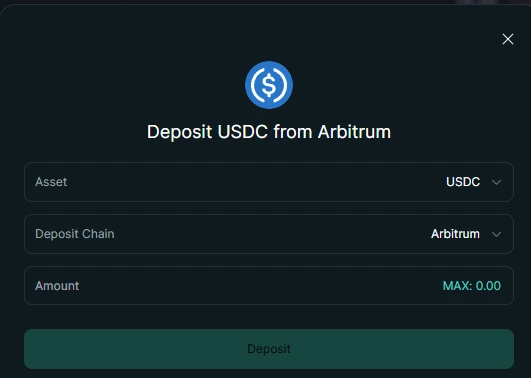
On this screen, you configure the parameters of a deposit, including the asset, network, and amount.
You can adjust these values freely before moving on. The deposit itself is created only after you confirm it in the next step.
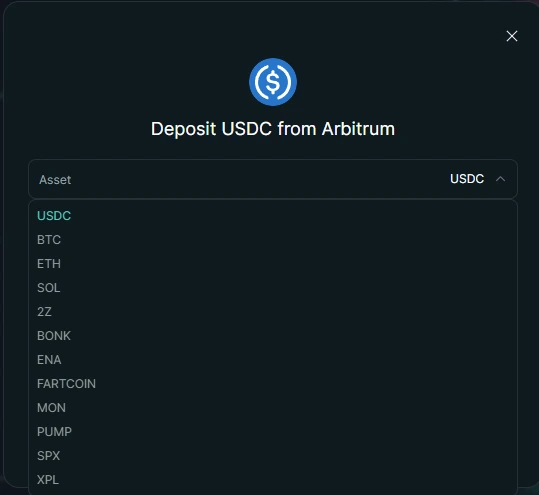
This list includes all assets that can be deposited and traded on the platform. While the selection may look extensive, the deposit flow works the same way for every asset. For clarity, the examples in this guide use USDC , since it represents the most common funding path.
Making a deposit
Configuring a deposit
On this screen, you configure what a deposit would look like in the system: the asset, the amount, and any interface-level parameters shown.
This means you are still preparing a future action. At this point, nothing has happened yet: no funds have moved, and nothing has been confirmed in your wallet.
Confirming the deposit
This is the action. This is where you approve a real request in your wallet.
This is where funds move. This is where consequences begin, because the approval creates an irreversible step that can be processed by the network and the system.
What happens after a deposit
After you confirm the deposit, the system can show intermediate states while the change is processed. You may see a pending or processing state before the balance reflects the new amount.
Funds become available when the deposit is recognized by the system as complete. Balances may not update instantly because the confirmation and indexing steps take time.
Reading your balances
This screen shows balances as fields that describe current state. Different balance types represent different parts of that state.
“Available” describes what the interface considers usable for a new action at this moment. It is a state description, not an action by itself.
End of this step
The deposit step is complete. Funds are now in the trading context shown by the interface balance. No trades or actions happen automatically. Any further interaction requires a new explicit action and a clear confirmation.